
A modern gaming setup can require more power outlets than you might expect.
Your gaming PC needs one. Your monitors need another. Then there’s your speakers, phone charger, headset dock, controller charger, RGB lighting, microphone, laptop, and whatever other accessories are sitting on the desk.
Before long, the wall outlet behind your gaming desk can turn into a mess of extension cords and power strips.
That’s where a gaming desk with built-in power outlets can make a real difference.
Instead of reaching behind the desk every time you need to plug something in, integrated outlets and USB charging ports put power directly where you need it. Some models take the idea even further with cable-management trays, monitor shelves, drawers, RGB lighting, and height-adjustable frames.
For gamers building a clean battlestation, this combination of workspace + power + cable management can be surprisingly useful.
In this guide, we’ll look at what to consider before buying one and the types of gaming desks worth considering for different setups and budgets.
Why Built-In Power Outlets Matter
Less Cable Clutter
The biggest advantage is convenience.
Instead of running multiple chargers toward a wall outlet, you can connect compatible accessories directly to the integrated power module.
That doesn’t eliminate every cable, but it can make the desktop much easier to manage.
Easier Access to Charging
Gaming desks often sit against a wall, making traditional outlets difficult to reach.
A built-in power station gives you easier access when charging:
- Smartphones
- Controllers
- Wireless headsets
- Tablets
- Gaming laptops
- USB accessories
It’s a small feature that becomes increasingly useful when your setup has multiple devices.
Better Gaming Setup Organization
Power management is part of good desk organization.
A clean setup usually combines:
- Integrated outlets
- Cable trays
- Cable clips
- Monitor arms
- Under-desk accessories
- Proper PC placement
The goal isn’t simply to hide every cable. It’s to keep cables organized enough that they don’t interfere with your gaming space.
What to Look For in a Gaming Desk With Power Outlets
Not every built-in power station is equally useful.
Before buying, consider these features.
Number of AC Outlets
For a gaming setup, two or more AC outlets can be useful.
However, don’t assume that every device should be connected to the desk’s power module.
High-powered equipment such as gaming PCs should be connected according to the desk’s electrical specifications and your home’s electrical requirements.
USB Charging Ports
USB-A and USB-C ports can make the desk much more convenient for charging smaller devices.
USB-C is particularly useful if you regularly charge newer smartphones, tablets, or accessories.

- All-in-One Storage Solution – This l-shaped desk with wood drawers, one file drawer that holds Letter/A4/Legal folders! …
- Gaming Desk with LED Lights & Glass Cabinet – Enhance your setup this l shaped gaming desk with LED lights! It includes …
- Farmhouse L Shaped Desk – Information about the farmhouse style elements of this desk makes it a perfect addition to any…
Cable Management
A power outlet without cable management only solves half the problem.
Look for:
- Cable trays
- Grommet holes
- Under-desk routing
- Velcro straps
- Dedicated power-cable channels
Desktop Size
For a single-monitor setup, around 47–55 inches may be enough.
For dual monitors, a 55–63-inch desk generally provides more breathing room.
Streamers may want even more space for microphones, cameras, lighting controls, and other equipment.
Stability
A desk can look great but still be frustrating if it shakes every time you move your mouse.
Look for a sturdy frame and adjustable feet, especially if you plan to use a monitor arm.
Best Gaming Desks With Built-In Power Outlets
Best Overall: AODK Gaming Desk With Power Outlets

AODK has several gaming desk configurations designed around modern PC setups.
The appeal is the combination of a large gaming surface with integrated charging functionality and storage.
Why We Like It
- Built-in power outlets
- USB charging ports on applicable configurations
- Storage options
- Gaming-oriented design
- Large work surface
- Cable-management features
This type of configuration works particularly well for gamers who have multiple accessories but don’t want a separate power strip sitting on top of the desk.

🛒 Find the Best Deal Today
Compare today’s prices, customer reviews, and latest Amazon deals before making your purchase.
Check Price on AmazonBest For
Gamers who want an all-in-one gaming workstation.
Best Budget: Aheaplus L Shaped Gaming Desk with Power Outlets

For shoppers who don’t want to spend a lot on a gaming desk, Aheaplus offers affordable workstation designs with integrated power features on select models.
Highlights
- Budget-friendly positioning
- Built-in charging options
- Modern appearance
- Compact configurations available
- Suitable for gaming and home office use
It’s a good direction for someone creating their first proper gaming setup.

🛒 Find the Best Deal Today
Compare today’s prices, customer reviews, and latest Amazon deals before making your purchase.
Check Price on AmazonBest For
Budget-conscious gamers and students.
Best for Large Setups: Lufeiya L Shaped Gaming Desk with Drawers & Storage Shelves

Lufeiya is known for larger gaming workstation designs that combine a substantial desktop with shelves, drawers, monitor storage, and integrated power features on select models.
Highlights
- Large workspace
- Storage shelves
- Drawers
- Monitor shelf
- Integrated power station on applicable versions
- Gaming-oriented appearance
This style makes sense if your desk needs to function as more than just a place for your keyboard and mouse.
🛒 Find the Best Deal Today
Compare today’s prices, customer reviews, and latest Amazon deals before making your purchase.
Check Price on AmazonBest For
Multi-monitor gaming setups and streamers.
Best for Small Rooms: Huuger 47 Inch Computer Desk with Power Outlets and LED Lights

A smaller desk can still benefit from integrated charging.
CubiCubi offers compact workstation designs that are better suited to bedrooms, apartments, dorm rooms, or smaller gaming spaces.
Why Consider It?
- Space-conscious design
- Modern appearance
- Integrated power functionality on applicable models
- Easier to fit into smaller rooms
- Suitable for gaming and studying

🛒 Find the Best Deal Today
Compare today’s prices, customer reviews, and latest Amazon deals before making your purchase.
Check Price on AmazonBest For
Gamers working with limited floor space.
Best Premium: X-WIN 71″ 4-Leg Electric Standing Gaming Desk with Flip-Top Cable Tray

If budget isn’t your main concern, the X-WIN 71 takes a very different approach.
Rather than simply attaching a power strip to the desktop, its design integrates power and cable management into the desk system.
The result is a particularly clean-looking gaming workstation.
Premium Features
- Integrated power system
- Designed for Long Work & Gaming Sessions: Whether you’re working from home, gaming for hours, or streaming content, this sit-stand desk helps reduce back and neck strain. Easily switch between sitting and standing to stay energized and focused throughout the day
- 4-Leg Stability for Multi-Monitor Setups: Built with a 4-leg structure, this desk provides superior stability compared to standard 2-leg desks. Supports heavy setups with multiple monitors, gaming PCs, or studio equipment without wobbling
- Flip-Top Design for Clean Cable Management: The flip-top panel allows you to hide cables, power strips, and accessories, keeping your desk organized and clutter-free
- Excellent cable management
- Magnetic accessories
- Metal construction
- Height-adjustable configuration
- Premium gaming-focused design
The MAGNUS Pro is especially interesting for enthusiasts who care as much about desk aesthetics as performance.

🛒 Find the Best Deal Today
Compare today’s prices, customer reviews, and latest Amazon deals before making your purchase.
Check Price on AmazonBest For
Premium gaming rooms and serious battlestations.
Gaming Desk Power Station vs Separate Power Strip
One question is worth asking before buying:
Do you actually need built-in outlets?
A separate power strip is usually cheaper and more flexible.
But an integrated power station can be much more convenient.
| Feature | Built-In Power | Separate Power Strip |
|---|---|---|
| Convenience | Excellent | Good |
| Cable organization | Excellent | Depends |
| Cost | Higher | Lower |
| Easy replacement | Limited | Excellent |
| Clean appearance | Excellent | Average |
| Portability | Low | High |
For a permanent gaming room, integrated power can be worthwhile.
For renters or people who frequently change their setup, a quality power strip may be the better choice.
Are Built-In Desk Outlets Safe?
Generally, integrated desk power systems are designed for everyday electronics, but you should always check the manufacturer’s electrical specifications.
More importantly, don’t treat a desk’s built-in outlets as a replacement for proper electrical protection.
Be Careful With High-Power Devices
A gaming PC can draw significantly more power than smaller accessories.
Before connecting a PC, monitor, speakers, and other equipment through a desk-mounted power system, check:
- Maximum rated load
- Voltage rating
- Outlet specifications
- USB output
- Manufacturer instructions
If you’re unsure about the electrical requirements, use a properly rated power solution rather than guessing.
How to Build a Cleaner Power Setup
A gaming desk with outlets is only the beginning.
Step 1: Put the PC in the Right Position
Keep the gaming PC somewhere with adequate ventilation.
If it’s on the floor, consider a PC stand to prevent dust buildup and make cleaning easier.
Step 2: Route Monitor Cables Together
Instead of running every cable separately toward the wall, route monitor cables through a single cable-management channel where possible.
Step 3: Use a Cable Tray
An under-desk tray is one of the easiest upgrades you can make.
It can hold:
- Power strips
- Excess cables
- Monitor power adapters
- USB hubs
Step 4: Separate Power and Data Cables
Keeping cables organized by purpose can make troubleshooting much easier.
For example:
Power:
PC → monitor → speakers → lighting
Data:
DisplayPort → USB → Ethernet → microphone
Step 5: Keep the Desktop Simple
The fewer cables crossing the desktop, the better.
Wireless peripherals can help, but even wired devices can look clean with proper routing.
Which Size Gaming Desk Should You Buy?
47–55 Inches
Best for:
- Single monitors
- Small bedrooms
- Dorm rooms
- Compact gaming setups
55–63 Inches
Best for:
- Dual monitors
- Gaming + work
- Larger keyboards
- Speakers
- Streaming equipment
This is probably the sweet spot for many gamers.
63+ Inches
Best for:
- Triple monitors
- Ultrawide displays
- Streamers
- Content creators
- Large gaming PCs
- Multiple accessories
More space is useful, but remember that a bigger desk also needs a suitable room.
Gaming Desks With Power Outlets vs Standing Desks
Since we recently covered standing gaming desks, it’s worth comparing the two concepts.
A traditional gaming desk with built-in outlets prioritizes convenience and organization.
A standing gaming desk prioritizes adjustability and ergonomics.
Some premium desks combine both.
If you frequently switch between gaming, working, and studying, a height-adjustable desk with integrated power may be the more versatile investment.
Frequently Asked Questions
Are gaming desks with built-in outlets worth it?
They can be worth it if you have multiple devices and want easier access to power. The biggest advantage is convenience and cleaner cable management.
Can I plug my gaming PC into a desk outlet?
It depends on the desk’s rated electrical capacity and specifications. Always verify the manufacturer’s maximum load before connecting higher-powered equipment.
Do gaming desks have USB ports?
Many modern gaming desks include USB charging ports, although the exact number and type vary by model.
Are built-in USB ports fast?
Not necessarily. USB charging performance depends on the desk’s specific power module. Check the listed output before buying if fast charging is important to you.
What’s the best desk size for two monitors?
A 55–63-inch desk is a good starting point for most dual-monitor gaming setups.
Do I still need a surge protector?
Potentially, yes. An integrated outlet doesn’t automatically mean the desk provides surge protection. Check the manufacturer’s specifications and use appropriate electrical protection for your equipment.
Are these desks good for streaming?
Yes. The additional power access can be particularly convenient for microphones, cameras, lighting, monitors, and charging accessories.

- 【Power Up Without the Cable Mess】Keep everything powered right where you need it. This gaming desk with charging station…
- 【RGB LED Lights with 60,000+ Colors】Turn your work desk into your favorite place to be. Choose from 12 preset lighting m…
- 【63×24 Inch Desktop with Ergonomic Monitor Stand】Your neck and back will thank you. The raised monitor shelf brings your…

- 【Extra-Large Workspace】Designed with a spacious 70 x 24 inch desktop, this computer desk gives you plenty of room for du…
- 【Flexible Charging Where You Need It】Charge your laptop, phone, speakers, monitor, and accessories without reaching for …
- 【One Desk for Every Room】From working remotely to studying, writing, or gaming, this versatile office desk easily adapts…
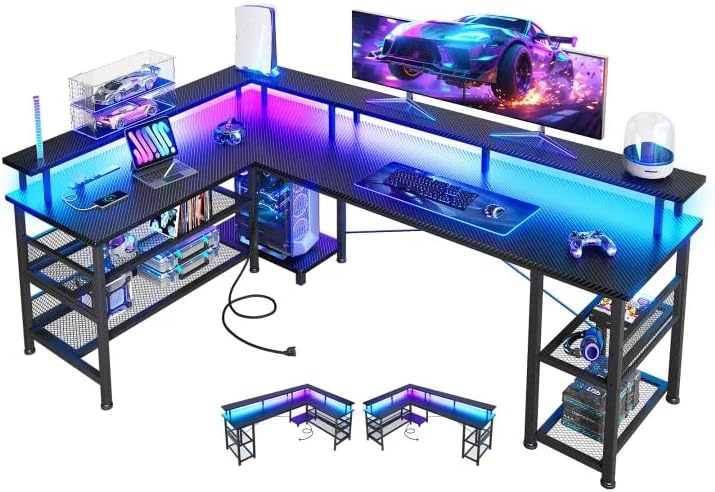
- 【Gaming Desk with LED Lights】:This l shaped desk with shelves features built-in LED lighting in 10 colors, 10 lightning …
- 【Convenient Charging & Monitor Stand】:The l shaped office desk is equipped with 3 standard plug outlets and 2 USB ports,…
- 【Reversible Gaming Desk】: The l shaped computer desk is with our reversible desk design to suit your space effortlessly….
Final Thoughts
A gaming desk with built-in power outlets isn’t necessarily a must-have for everyone, but it can make a major difference once your setup starts accumulating more devices.
For a simple single-monitor setup, a standard desk and quality power strip may be perfectly adequate. But once you’re running dual monitors, speakers, a microphone, RGB lighting, controllers, and multiple charging devices, integrated power becomes much more attractive.
For an all-in-one gaming workstation, AODK and SEDETA offer the type of feature-rich configurations many gamers are looking for. For smaller spaces, a compact power-equipped desk can help keep the setup organized without consuming the entire room.
And if you’re building a premium battlestation and want the cleanest possible cable-management solution, the Secretlab MAGNUS Pro is one of the more interesting options in this category.
The important thing is to look beyond the built-in outlets. Desktop size, frame stability, cable management, electrical specifications, and your actual gaming equipment all matter just as much.
Disclosure: This post contains affiliate links. If you click through and make a purchase, we may earn a small commission at no extra cost to you. We only recommend products we genuinely believe offer great value.