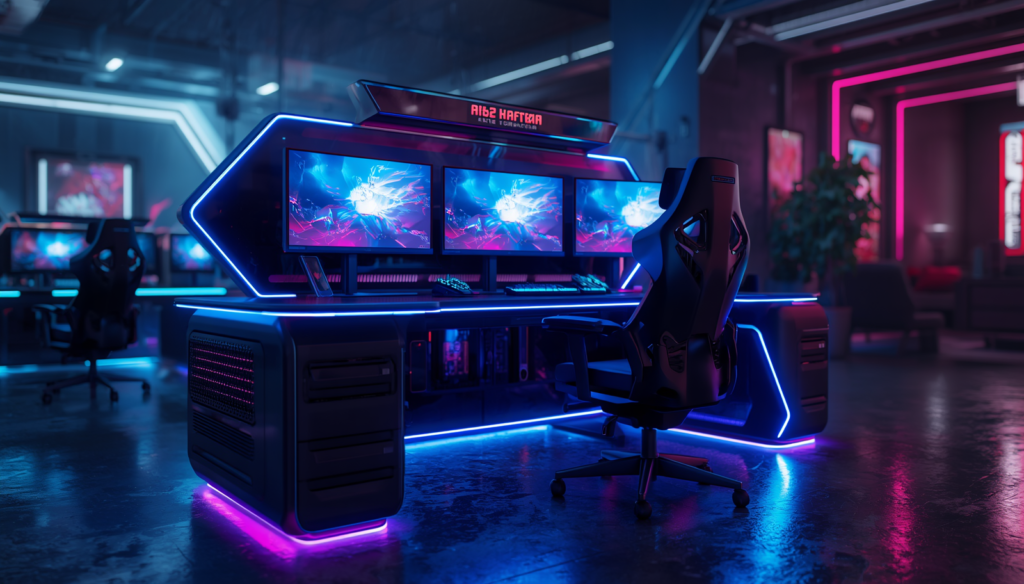
You don’t need to spend $500 or more to build a good gaming desk setup.
In fact, the under-$300 price range is one of the most interesting parts of the gaming furniture market right now. There are plenty of desks offering large desktops, sturdy frames, cable-management features, monitor shelves, storage, RGB lighting, and even electric height adjustment.
The challenge isn’t finding a gaming desk under $300.
It’s finding one that doesn’t sacrifice the things that actually matter.
A flashy desk with RGB lighting may look great in product photos, but stability, desktop space, construction quality, and cable management are much more important when you’re using the desk every day.
Whether you’re building a dual-monitor battlestation, upgrading a small gaming room, or looking for a desk that can handle both gaming and work, this guide will help you narrow down the options.
Why Buy a Gaming Desk Under $300?
A $300 budget gives you considerably more flexibility than the entry-level gaming desk market.
You can start looking for desks with:
- Larger desktops
- Better frames
- Storage systems
- Cable management
- Monitor shelves
- Power outlets
- RGB lighting
- Height adjustment
- L-shaped designs
The key is knowing which features deserve your money.
What to Look For in a Gaming Desk Under $300
1. Desktop Size
Before worrying about RGB lighting or accessories, measure your gaming equipment.
A single 27-inch monitor doesn’t need a huge desk.
A dual-monitor setup with speakers, a microphone, and a full-size PC does.
Recommended sizes
47–55 inches:
Good for compact gaming setups.
55–63 inches:
Excellent for dual monitors.
63+ inches:
Better for streamers and large battlestations.
2. Desk Stability
Stability should be near the top of your checklist.
A desk that shakes when you’re gaming can become extremely annoying, especially when using a monitor arm.
Look for:
- Steel legs
- Reinforced frames
- Adjustable feet
- Thick desktop panels
- Wide leg placement
Don’t automatically assume a heavier-looking desk is better, though. Construction quality matters more than appearance.
3. Cable Management
Cable management is one of the easiest ways to make a gaming room look dramatically better.
Look for:
- Cable trays
- Grommets
- Under-desk routing
- Cable clips
- Power-strip storage
If your gaming PC, monitors, speakers, microphone, and accessories all sit on the same desk, cable management becomes particularly important.
4. Ergonomics
A desk should work with your chair and monitor setup.
Your keyboard shouldn’t be positioned so high that your shoulders remain raised during gaming.
Your monitor should also be positioned at a comfortable viewing height.
Some desks under $300 now offer height adjustment, making it possible to alternate between sitting and standing.
5. Storage
Storage is useful, but don’t sacrifice desktop space just to get extra shelves.
Consider what you actually need to store:
- Controllers
- Headsets
- Games
- Books
- Streaming accessories
- Chargers
- Small electronics
A simple drawer or side shelf can sometimes be more useful than a huge shelving system.
Best Gaming Desks Under $300
🏆 Best Overall: X-WIN 71″ 4-Leg Electric Standing Gaming Desk with Flip-Top Cable Tray

X-WIN 71″ lineup is worth considering if you want a gaming-focused desk that prioritizes stability and a dedicated gaming workspace.
Depending on the configuration, Eureka offers different desktop sizes and designs aimed at gaming setups.
Why It’s a Strong Pick
- Gaming-oriented design
- Sturdy frame
- Large desktop options
- Good monitor space
- Cable-management accessories on select models
- Multiple configurations
It’s a good middle ground for someone who wants something more substantial than a basic computer desk.

🛒 Find the Best Deal Today
Compare today’s prices, customer reviews, and latest Amazon deals before making your purchase.
Check Price on AmazonBest For
Gamers who want a dedicated gaming desk without entering the premium price category.
💰 Best Budget: Furinno Gaming/Computer Desk

Furinno is an interesting option for shoppers who care more about affordability than premium gaming aesthetics.
Some models are extremely simple, but that isn’t necessarily a bad thing.
A straightforward computer desk can be a better value if you don’t need RGB lighting, shelves, or gaming-specific accessories.
Advantages
- Low price
- Simple construction
- Compact options
- Good for small rooms
- Easy to combine with your own accessories

🛒 Find the Best Deal Today
Compare today’s prices, customer reviews, and latest Amazon deals before making your purchase.
Check Price on AmazonBest For
Students, beginners, and compact gaming setups.
⭐ Best Value: Bestier Gaming Desk

Bestier offers several gaming desks with features aimed at gamers who want more than just a basic tabletop.
Depending on the configuration, you can find features such as:
- Storage
- LED lighting
- Monitor shelves
- Cable management
- Power outlets
- Large desktops
The important thing is to check the exact configuration before purchasing because Bestier sells several desk variations.

🛒 Find the Best Deal Today
Compare today’s prices, customer reviews, and latest Amazon deals before making your purchase.
Check Price on AmazonBest For
Gamers looking for extra features without spending premium money.
🖥️ Best for Dual Monitors: Large 55–63 Inch Gaming Desk

If you’re running two monitors, don’t automatically choose a desk simply because it has a gaming aesthetic.
Prioritize surface area.
A 55–63-inch desk gives you much more flexibility for:
- Two monitors
- Monitor arm
- Keyboard
- Mouse
- Speakers
- Microphone
- Controller dock
A large rectangular desk can actually be a better option than a smaller desk covered in accessories.

🛒 Find the Best Deal Today
Compare today’s prices, customer reviews, and latest Amazon deals before making your purchase.
Check Price on Amazon🏠 Best for Small Rooms: Compact Gaming Desk

Not everyone has space for a massive battlestation.
If your gaming room is small, a compact 47–55-inch desk can provide enough room for a monitor and gaming PC without making the room feel crowded.
Look for a desk with:
- Simple legs
- Minimal shelving
- Cable management
- Smaller footprint
You can always add accessories later.

🛒 Find the Best Deal Today
Compare today’s prices, customer reviews, and latest Amazon deals before making your purchase.
Check Price on Amazon🧍 Best Height-Adjustable Option Under $300
One of the biggest improvements in the budget desk market is the availability of electric standing desks.
Current desk guides show that affordable electric standing models can now compete surprisingly well on features, although stability and lifting capacity still vary considerably between models.
If you spend several hours gaming and also use your desk for work or school, height adjustment can be more valuable than RGB lighting.
Gaming Desk Features: What Should You Prioritize?
Here’s how I’d rank the features when shopping under $300.
| Feature | Importance |
|---|---|
| Stability | ⭐⭐⭐⭐⭐ |
| Desktop Space | ⭐⭐⭐⭐⭐ |
| Cable Management | ⭐⭐⭐⭐ |
| Ergonomics | ⭐⭐⭐⭐ |
| Build Quality | ⭐⭐⭐⭐⭐ |
| Storage | ⭐⭐⭐ |
| RGB Lighting | ⭐⭐ |
| Cup Holder | ⭐ |
| Headset Hook | ⭐⭐ |
This is important because gaming desks often advertise inexpensive accessories heavily.
A headset hook is nice.
A stable desk is essential.
Gaming Desk vs Office Desk Under $300
You don’t necessarily need a desk marketed specifically for gaming.
In fact, a standard office or computer desk can sometimes provide better value.
Gaming desks typically emphasize:
- RGB
- Carbon-fiber-style surfaces
- Headset hooks
- Cup holders
- Aggressive styling
Office desks may focus more on:
- Simplicity
- Workspace
- Stability
- Storage
- Ergonomics
If you’re building a minimalist gaming room, an office-style desk can actually look better.
How Much Desk Do You Really Need?
Single Monitor
A 47–55-inch desk should be plenty.
Dual Monitor
Aim for around 55–63 inches.
Ultrawide Monitor
A 55-inch desk can work, but 63 inches gives you more flexibility.
Triple Monitor
Consider 63+ inches or an L-shaped design.
Streaming Setup
You’ll probably want extra room for:
- Microphone
- Camera
- Lighting controls
- Stream deck
- Audio interface
- Multiple displays
In this case, bigger is usually better.
Don’t Forget Your Gaming Chair
A good desk can’t compensate for a poor chair.
Your desk and chair should work together.
The height of the chair should allow your feet to rest comfortably on the floor while your arms can reach the keyboard without excessive shoulder tension.
This is why choosing a gaming chair and desk together often produces a better result than buying either one independently.
How to Build a $300 Gaming Desk Setup
If your total budget is $300, don’t spend the entire amount on the desk.
A more balanced approach might look like this:
Desk: $150–$220
Large desk mat: $15–$25
Cable management: $10–$20
Monitor arm: $30–$50
That leaves you with a practical workstation rather than an expensive desk covered with cheap accessories.
Are Gaming Desks Under $300 Good Enough?
Absolutely.
The biggest difference between a $200 desk and a $600+ premium desk isn’t necessarily gaming performance.
A more expensive desk may offer:
- Better materials
- Better cable management
- More refined mechanisms
- Higher weight capacity
- Premium finishes
- Better accessories
But if you simply need a stable surface for gaming, you don’t necessarily need to spend hundreds more.
Community discussions around budget setups also frequently point out that a basic sturdy desk can provide excellent value compared with paying extra simply for a “gaming” label.
Frequently Asked Questions
What is the best gaming desk under $300?
The best choice depends on your setup. For most gamers, prioritize a sturdy 55–63-inch desk with good cable management before looking at cosmetic features.
Is $300 enough for a good gaming desk?
Yes. $300 gives you access to a wide range of desks, including large models and some height-adjustable options.
What size gaming desk should I get for two monitors?
A 55–63-inch desk is a good starting point for most dual-monitor setups.
Are cheap gaming desks worth it?
They can be, especially when you focus on stability and workspace rather than RGB features.
Should I get an L-shaped desk?
Choose an L-shaped desk if you need significant workspace or want to separate gaming from work. For a straightforward single or dual-monitor setup, a rectangular desk is often simpler.
Is a standing desk better than a gaming desk?
Not necessarily. A standing desk is better if height adjustment is important to you. A traditional gaming desk may provide more gaming-specific features for the same budget.
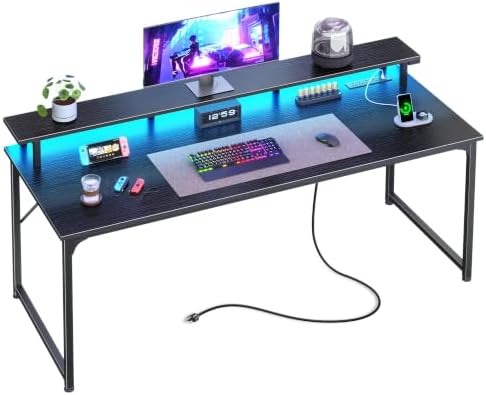
- 【Power Up Without the Cable Mess】Keep everything powered right where you need it. This gaming desk with charging station…
- 【RGB LED Lights with 60,000+ Colors】Turn your work desk into your favorite place to be. Choose from 12 preset lighting m…
- 【54×19.7 Inch Desktop with Ergonomic Monitor Stand】Your neck and back will thank you. The raised monitor shelf brings yo…

- Sturdy and Durable: Gaming desk leg is z-shape design, stable structure, metal frame, strong and durable. Adjustable fee…
- Comfortable Experience: Game desktop is made of high quality density fiberboard, PVC coated surface, steel tube frame, s…
- Large Desktop Gaming Desk: Designed for gaming, the gaming table is composed of two large gaming tables with a length of…

- Space-Saving & Multi-Functional Design – Maximize your workspace with this all-in-one desk featuring a spacious desktop,…
- Reversible Storage Shelves for Flexible Layout – Designed with a reversible structure, the storage shelves can be instal…
- Ergonomic Monitor Stand for Better Posture – The raised monitor shelf helps keep your screen at eye level, reducing neck…
Final Thoughts
You don’t need a massive budget to create a great gaming battlestation.
The $300-and-under category has become particularly competitive, giving gamers access to larger desktops, improved frames, cable management, storage, and even electric height adjustment.
The smartest approach is to decide what your setup actually needs before shopping.
If you’re running dual monitors, spend your money on workspace. If you’re in a small bedroom, prioritize footprint. If you also work from your gaming desk, consider height adjustment. And if you’re building a clean-looking setup, cable management may be more valuable than RGB lighting.
For most gamers, I’d prioritize stability, desktop space, and cable management first, then look at extras.
That’s how you get the most gaming desk for your $300.
Disclosure: This post contains affiliate links. If you click through and make a purchase, we may earn a small commission at no extra cost to you. We only recommend products we genuinely believe offer great value.