Introduction
A good gaming desk does more than hold your monitor and keyboard.
It can become the foundation of your entire gaming setup.
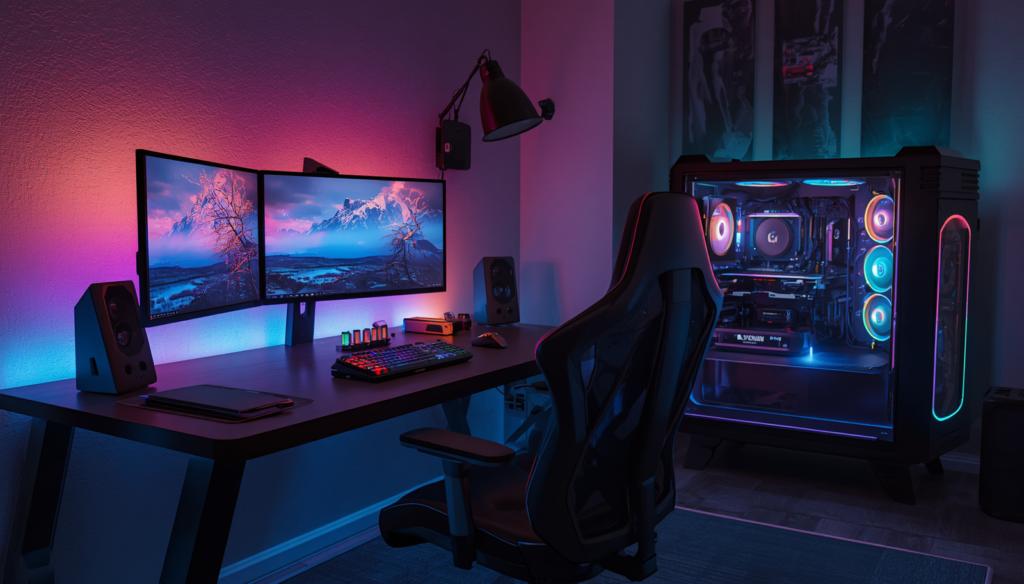
Over the last few years, RGB lighting has moved beyond keyboards, mice, and PC cases. Today, many gaming desks include built-in LED strips, illuminated monitor shelves, or integrated RGB lighting systems designed to add atmosphere without requiring extra accessories.
For some gamers, LED lighting is purely about appearance. For others, it helps create a more immersive gaming room, especially when combined with a PC, monitor backlighting, and other RGB accessories.
The problem is that RGB lighting alone doesn’t make a desk good.
A gaming desk still needs to be stable, spacious, comfortable, and practical. If you’re building a dual-monitor setup, desktop size matters more than flashy lighting. If your room is small, a compact footprint may be more important than having dozens of RGB modes.
The best gaming desks with LED lights combine visual appeal with useful features such as storage, monitor shelves, cable management, power outlets, and enough workspace for your equipment.
In this guide, we’ll look at several types of LED gaming desks that stand out for different needs, from compact setups to large L-shaped battlestations.
Why Choose a Gaming Desk With LED Lights?
A More Immersive Gaming Environment
Lighting can dramatically change the atmosphere of a room.
A built-in LED strip under a monitor shelf or along the edge of a desk can add depth to a gaming setup without taking up valuable desktop space.
Many modern RGB desk systems offer multiple colors and lighting modes, allowing you to change the look of your setup depending on what you’re playing.
A calm blue or purple glow might work well for a relaxed single-player game, while brighter effects can create a more energetic setup.
Less Need for Extra Accessories
Instead of buying and installing separate LED strips, a desk with integrated lighting can provide a cleaner solution.
The lighting system is already designed to work with the desk layout, which can make cable management easier.
That said, you should still check how the LEDs are powered and where the control unit is located.
Better Visual Organization
Lighting can also help define different parts of your gaming space.
For example:
- Monitor lighting can define the display area.
- Desk lighting can highlight the main workstation.
- PC lighting can become the focal point.
- Ambient room lighting can tie the entire setup together.
The goal isn’t necessarily to add more lights.
It’s to create a setup that feels intentional.
What to Look For Before Buying
Desktop Size
Always start with workspace.
For a compact setup with one monitor, around 47 to 55 inches may be enough.
For dual monitors, a desk around 55 to 63 inches generally provides more flexibility.
Large L-shaped desks can be especially useful for gamers who need separate areas for gaming, work, or streaming.
LED Control Options
Not every LED desk offers the same controls.
Depending on the model, you may find:
- Multiple static colors
- Dynamic lighting modes
- App control
- Remote control
- Music synchronization
- Timer functions
For example, current SEDETA models advertise RGB systems with a large color selection, multiple lighting modes, app control, and music-sync features on applicable desks.
More lighting modes don’t automatically make a desk better, but convenient controls can make the feature more enjoyable.
Power Outlets and USB Charging
An LED gaming desk becomes more useful when it also includes power access.
Built-in outlets and USB ports can simplify charging for:
- Controllers
- Wireless headsets
- Smartphones
- Tablets
- Small gaming accessories
However, always check the desk’s electrical specifications before connecting high-power equipment.
Storage
A desk with RGB lighting can still look cluttered if all your accessories are sitting on the desktop.
Useful storage features include:
- Shelves
- Fabric drawers
- CPU stands
- Pegboards
- Headphone hooks
- Storage bags
Choose storage based on what you actually use.
Cable Management
LED lighting adds another cable to your setup.
Look for cable-management holes, trays, clips, or hidden routing areas to prevent the underside of the desk from becoming a mess.
Product Recommendations
🏆 Best Overall: SEDETA L-Shaped Gaming Desk With LED Lights

- Extra-Large Storage Capacity – This l-shaped gaming desk with drawers includes 2 fabric drawers—plus one file drawer tha…
- 2-in-1 Convertible Desk – l shaped desk for home office, or 97.6” straight two person desk for interference-free studyin…
- Integrated Power Strip & Executive L-Shaped Desk – This corner gaming/office desk features a built-in surge protector wi…
For gamers who want an LED desk with plenty of useful features, SEDETA’s L-shaped gaming desk is a strong all-around option.
Recent Amazon-oriented comparisons list current SEDETA configurations with RGB LED lighting, built-in power access, pegboard storage, a keyboard tray, and a reversible L-shaped design.
Why It Stands Out
- L-shaped workspace
- RGB LED lighting
- Power outlets and USB ports on applicable configurations
- Storage features
- Pegboard on selected models
- Keyboard tray on selected models
- Good use of corner space
Best For
Gamers who want a feature-packed desk for a dual-monitor or multitasking setup.
Because SEDETA offers several versions, always check the exact listing before publishing your Amazon affiliate link.
💰 Best Budget: ODK 53-Inch L-Shaped Gaming Desk With LED Lighting

- 【Computer Desk with Powerful Storage Function】This L-shaped computer desk features integrated storage solutions: dual sh…
- 【Built-in USB Charging Ports & Power Outlets 】Equipped with 3 AC outlets and 2 USB ports, providing centralized power ac…
- 【L Gaming Desk with Adjustable LED Lighting】The gaming desk comes with an RGB LED strip with 10 color presets, 8 brightn…
The ODK 53-inch L-shaped desk is a good choice for gamers looking for an affordable desk with both LED lighting and useful everyday features.
Recent Amazon-oriented listings include a reversible design, LED lighting, storage shelving, a bag and hook, and power outlets on the applicable model.
Why We Like It
- Budget-friendly category
- Reversible L-shaped layout
- LED lighting
- Storage shelves
- Power outlets on applicable versions
- Good for corner setups
Best For
Gamers who want RGB style without spending heavily on a desk.
This is the type of desk that makes sense for a first gaming room or a budget-conscious battlestation.
⭐ Best Value: AODK L-Shaped Gaming Desk With LED Light and Power Outlet

- 【AODK Reversible L Shape Desk】This L shaped gaming desk comes with storage shelves, power outlet, light strip, CPU stand…
- 【Power Outlets & Charging Ports】 AODK computer desk is equipped with 3 power outlets & 2 USB charging ports for your ele…
- 【Gaming Desk with Colorful LED Lights】This gaming desk features LED strip that contains 10 static colors, 8 brightness g…
AODK offers a practical combination of gaming features without requiring a premium budget.
A current Amazon-oriented listing for the 53-inch model includes LED lighting, a power outlet, a reversible L-shaped design, shelving, a storage bag, and a hook. It has also appeared among tracked high-selling gaming desk listings in 2026.
Why We Like It
- LED lighting
- Built-in power access
- Reversible design
- Storage shelf
- Accessory storage
- Strong value proposition
Best For
Gamers who want the best balance of price, workspace, lighting, and practical features.
🖥️ Best for Dual Monitors: Bestier 71-Inch L-Shaped LED Gaming Desk

- 【Large Storage Space】AODK L-shaped desk provides 5 fabric drawers, 6-tier open shelves and CPU stand. Store frequently u…
- 【Spacious Desktop Workspace】 With main desk size 71”W x 18.90”D x 60.71”H. This L-shaped desk keeps items organized and …
- 【5 Large Fabric Drawers】Includes 1 fabric file drawer and 4 spacious storage drawers for ample organization. The file ca…
A larger setup needs more than RGB lighting.
The Bestier 71-inch L-shaped desk is aimed at gamers who need significant workspace for multiple displays and accessories.
A recent 2026 gaming desk comparison highlighted this model for its large surface, integrated power strip, adjustable shelf, and RGB lighting system with multiple static and dynamic modes.
Why We Like It
- Large L-shaped surface
- Suitable for multi-monitor setups
- Built-in power access
- USB charging on the listed configuration
- RGB lighting
- Adjustable shelf
Best For
Dual-monitor, ultrawide, and larger gaming setups.
Before buying, measure your room carefully. A desk this large can dominate a small bedroom.
🏠 Best for Small Spaces: SEDETA 55-Inch Gaming Desk With LED Lights
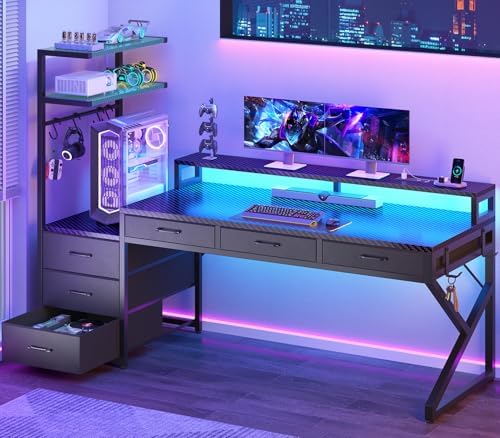
- 【Ample Storage Space】This gaming table has a variety of storage space. The 6 cloth drawers can hold your smaller items, …
- 【Cool & Smart Led Light】The PC desk comes with RGB LED light , remote control via APP, Over 60000 colors and 29 flashing…
- 【Power Outlets】This computer desk has a built-in power supply with 2 AC power sockets and 2 USB charging ports, which ca…
Not every LED gaming setup needs an L-shaped desk.
SEDETA’s 55-inch gaming desk offers a more traditional straight layout while adding a monitor shelf, storage shelves, LED lighting, power outlets, and other gaming-oriented features. The manufacturer lists both black and white color options for this model line.
Why We Like It
- Straight desk layout
- 55-inch workspace
- Monitor shelf
- LED lighting
- Storage shelves
- Power outlet
- Available in multiple colors
Best For
Gamers who want a feature-rich desk without needing a large corner workstation.
💎 Best Premium Alternative: SEDETA 79-Inch Gaming Desk With LED Lights

- 【What will you get?】 78.7″*21.7″ oversized Wing-shaped combat gaming desk with 2 fabric drawers, monitor shelf that can …
- 【A Bit More Practical】 Desktop is made of FSC certified wood. The specially cut Wing-shaped desktop of computer desk is …
- 【Special Desktop Design】 LED strips that control color and changing rhythm with APP can be installed in any position. Ga…
For gamers who need additional vertical storage, the SEDETA 79-inch desk with hutch is worth considering.
The manufacturer lists a configuration with LED lighting, a built-in monitor stand, storage shelves, display storage, power outlets, a CPU holder, cup holder, and headphone hook. White is also listed as an available color.
Why We Like It
- Large storage area
- LED lighting
- Monitor stand
- Power access
- Multiple accessory holders
- Good for equipment-heavy setups
Best For
Gamers and content creators who need storage as much as desktop space.
The main consideration is its overall height. Measure your wall space and room layout before purchasing.
Quick Comparison
| Product | Best For | Shape | LED Lighting | Power Features | Workspace |
|---|---|---|---|---|---|
| SEDETA L-Shaped | Best Overall | L-Shaped | Yes | Yes on applicable models | Large |
| ODK 53-Inch | Best Budget | L-Shaped | Yes | Yes on applicable models | Medium |
| AODK 53-Inch | Best Value | L-Shaped | Yes | Yes | Medium |
| Bestier 71-Inch | Dual Monitors | L-Shaped | Yes | Yes | Very Large |
| SEDETA 55-Inch | Small Spaces | Straight | Yes | Yes | Medium |
| SEDETA 60-Inch With LED | Storage | Straight | Yes | Yes | Large |
Important: Product pricing, exact features, colors, configurations, and Amazon availability can change. Before publishing, verify the exact Amazon US listing you plan to use for your affiliate link.
Gaming Desk With LED Lights vs Separate RGB Lighting
Should you buy a desk with built-in LEDs, or add lighting yourself?
Built-In LED Desk
Pros
- Cleaner integrated look
- No need to install a separate light strip
- Lighting follows the desk design
- Can include dedicated controls
- Often paired with other gaming features
Cons
- Less flexibility if the lighting fails
- Some budget systems offer basic controls
- You may pay more for a feature you don’t use often
Separate RGB Lighting
Pros
- More placement flexibility
- Easier to replace
- Can be customized independently
- Works with almost any desk
Cons
- More cables
- Requires installation
- Can look messy without cable management
If you already own a sturdy desk you like, adding lighting separately may make more sense.
If you’re building an entirely new gaming room, an integrated LED desk can create a cleaner starting point.
How to Create a Better RGB Gaming Setup
A gaming desk with LEDs should complement the rest of the room rather than compete with it.
Choose One Main Lighting Color
Using one primary color with a secondary accent often looks cleaner than constantly cycling through every RGB mode.
Popular combinations include:
- Blue and purple
- Cyan and white
- Orange and red
- Green and blue
- White with a subtle accent color
Add Monitor Backlighting
Monitor backlighting can reduce the visual contrast between a bright screen and a dark wall.
It can also make the desk area feel more immersive.
Keep the Desktop Clean
Lighting looks better when the desk isn’t covered with unnecessary accessories.
Use storage for controllers, chargers, and other equipment whenever possible.
Hide the Cables
Use:
- Cable sleeves
- Under-desk trays
- Cable clips
- Velcro straps
RGB lighting can highlight your setup, but visible cables underneath the desk can still make the room look unfinished.
What Size LED Gaming Desk Should You Buy?
Compact Setup
A 47- to 55-inch desk is usually enough for:
- One monitor
- Keyboard
- Mouse
- Small speakers
- Basic accessories
Dual-Monitor Setup
Look for approximately 55 to 63 inches or a suitable L-shaped desk.
This gives you more flexibility for monitor placement and mouse movement.
Large Battlestation
A 70-inch desk or larger L-shaped workstation may be better for:
- Multiple monitors
- Streaming equipment
- Audio gear
- Larger PCs
- Multiple accessories
The larger the desk, the more important room measurements become.

- Large Gaming Desk: 60-inch large-sized computer desk, carbon fiber desktop, high stability and good touch, can accommoda…
- Ultra-Sturdy Z-Shaped Design: The gaming table is designed with ultra-stable and sturdy Z-shaped legs. Rebar is 3.15″ wi…
- Dynamic Rgb Lighting: The Gaming Desk with LED lights to give you the best gaming experience possible. Pick your favorit…
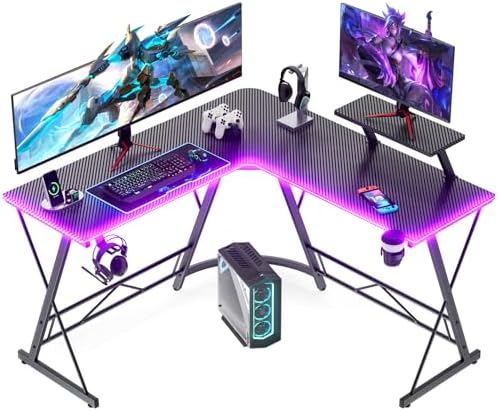
- Suprising Gifts: As for this gaming desk, we’ve got three awesome gifts for you. First up, RGB light strips that you can…
- Durable & Sturdy Construction: Constructed with thicken metal frame and P2 MDF board, this upgraded L shaped desk is muc…
- Large Desktop & Ample Leg Room: This corner desk with 50.8″L x 18.2″W double black-colored desktops ensure your conversi…

- 【2-in-1 Gaming Desk: L-Shaped or Long Table】Need to fit into a corner or run along a wall? This multi-functional l desk …
- 【RGB LED Light Strip 】Create your perfect setup with RGB LED lights on the gaming desk with storage — 12 dynamic modes, …
- 【Computer Desk with Charging Station】Tired of extension cords under the l shaped desk with storage? Built-in charging st…
Frequently Asked Questions
Are gaming desks with LED lights worth it?
They can be worth it if you want integrated RGB lighting and are already shopping for a new desk. However, workspace, stability, and ergonomics should be more important than lighting alone.
Do LED gaming desks use a lot of electricity?
LED strips generally use relatively little power compared with gaming PCs and monitors. Exact power consumption depends on the lighting system and its specifications.
Can I turn off the LED lights?
Most gaming desks with built-in LED systems allow the lighting to be turned off, although the controls vary by model.
Are L-shaped LED gaming desks better?
They aren’t automatically better, but they provide more workspace and make efficient use of room corners.
What size desk is best for two monitors?
For most dual-monitor setups, a 55- to 63-inch desk or a reasonably sized L-shaped desk is a good starting point.
Do gaming desks with LEDs have power outlets?
Some do, but not all. Many current models combine LED lighting with AC outlets and USB charging ports, while others only include the lighting system.
Can I use a monitor arm on an LED gaming desk?
Usually, but check the desk’s edge design, thickness, and weight recommendations before installing a clamp-mounted monitor arm.
Final Thoughts
A gaming desk with LED lights can make your battlestation feel more complete, but the RGB feature should be a bonus—not the main reason you buy the desk.
The best option is one that gives you enough workspace, remains stable during everyday use, and provides practical features that actually fit your setup.
For an all-around feature-rich option, the SEDETA L-shaped gaming desk offers a combination of RGB lighting, storage, and power features on applicable configurations. The ODK 53-inch L-shaped desk is a strong budget-friendly direction, while the AODK L-shaped gaming desk offers an excellent balance of price and useful features.
Gamers with larger multi-monitor setups may prefer the Bestier 71-inch L-shaped desk, while smaller rooms may be better served by the SEDETA 55-inch straight gaming desk.
No matter which one you choose, remember that a great gaming setup is built around comfort and organization first.
The lighting simply makes it look even better.
Disclosure: This post contains affiliate links. If you click through and make a purchase, we may earn a small commission at no extra cost to you. We only recommend products we genuinely believe offer great value.